Chantelle van Heerden

Updated 2 months ago

Manage Your Phone Efficiently with MyPhoneExplorer

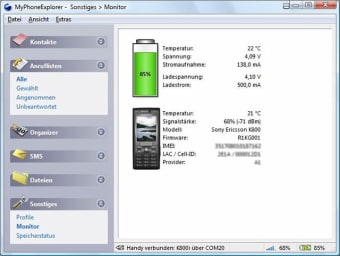
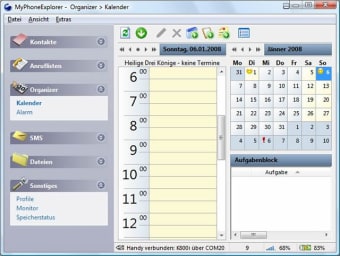
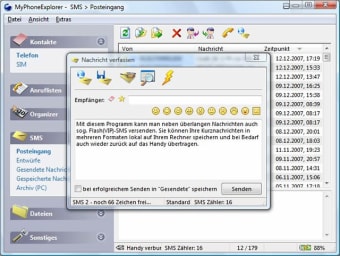
MyPhoneExplorer is a free application designed for Windows that facilitates seamless management of mobile devices. This software allows users to connect their phones to a PC, enabling file transfers, SMS management, and contact synchronization. With a user-friendly interface, it supports various mobile platforms and offers functionalities such as viewing and editing contacts, managing calendars, and backing up important data.

Top Recommended Alternative

In addition to basic management features, MyPhoneExplorer also enables remote control of the device, allowing users to access their phone’s content directly from their computer. The application supports both USB and Wi-Fi connections, making it versatile for different user preferences. Overall, MyPhoneExplorer is a comprehensive tool for anyone looking to enhance their mobile device management experience.


Chantelle van Heerden

With over 12 years in marketing and project management, she has led digital campaigns, events, and design projects for international clients. Alongside her agency work, she has contributed written content across multiple formats, combining professional expertise with a passion for communication and creative storytelling.

 0/3

App specs

Program available in other languages


User reviews about MyPhoneExplorer

4.1

14 reviews

Add review

Main reviews for you

  • Anonymous user

    I've used this app for years on different PCs, far prefer it to Windows phone connections. Functions pretty seamlessly via USB and WiFi, though they sometimes require repeated permissions to connect (but not app's fault!). I've used on many different phones and it allows easy backup to different PC devices. Main uses: SMS sync and SMS keyboard, file upload/download, contact updating etc

  • Anonymous user

    This software had a function 15 years ago but today it is just to unstable and hard to use to have any practical value. You need to manually connect and try several times every time and you need to manually start an app on the phone and check everything every time. That is not how you are used to have a work flow in 2021.

  • Anonymous user

    The software is excellent beyond words. It is even free and comes with portable version. One with good heart may consider donating with free will with no conditions what so amount he/she is comfortable. You donate or don't, still you enjoy all the features.Thanks.

  • Anonymous user

    ** EXCELLENT ** version 1.8.15I use to have Android-Sync which worked perfectly over USB. But the developers stopped updating it to keep compatibility with the Windows OS. It no longer works and the developers stopped responding to support inquiries. However, they still advertise and sell the app claiming ti works with the current versions of Windows and Outlook. IT DOES NOT. This app picks up where they left off and works flawlessly with my android Samsung Galaxy Note phone. THANK YOU!All I wanted was a simple sync app that could sync contacts, notes, tasks and calendar events locally over USB without the need to give a cloud service.access to my phone or requiring a bunch of additional third party apps like DejaOffice. THIS IS IT.PLEASANT SURPRISES:It keeps your call log. Calls can be filtered by all, dialed, answered and missedYou can click on a log entry and initiate a call back via your mobile phoneYou can send and respond to text messages (No more typing on a small phone screen when on my computer)You can access both internal and external storage items on your phone (view pictures, play music, etc...)Incoming calls generate a small popup notification which can be turned on/offThese are just the features that I am using. There are a lot more features and a lot of flexibility and customization that you can play with.I LOVE THIS APP and I will be making a donation on the developer's website to the support their work.

  • Anonymous user

    Excelent apka. Every good apications. Usualy every day.Samtime not conected.

  • Anonymous user

    Update for Android 4.0. I love this since I first used it for my Sony Ericsson Phone K530i and now I use it Sony Ericsson Xperia Mini. It was unbelievable for me to see how great the features were when I used for the fist time! Great Work ! Pros: All features of this software are Pros. I can safely keep all the contacts, call logs, sms and everything else from my phone to my computer. Cons: When I upgraded to Android 4.0 it suddenly stopped Sync Organiser which means it can not read the calender and other organiser related things such as events, birthday reminders etc but its OK with me as I don't use them much.

More

You may also like

Alternatives to MyPhoneExplorer

Explore Apps

Latest articles

Laws concerning the use of this software vary from country to country. We do not encourage or condone the use of this program if it is in violation of these laws.
Softonic

Is MyPhoneExplorer safe?

100/100

Score result: Clean

This file passed a comprehensive security scan using VirusTotal technology. It is safe to download.

  • Virus free
  • Spyware free
  • Malware free
  • Verified by Security Partners

    VirusTotal logo

Scan Info

Last scan
Wednesday, January 7, 2026
Scan provider
VirusTotal · Full report

File Integrity

File
2.3.exe
SHA256
6842d155ff858430c69837845eb211fdff1fd403d5a7b741aad637c09778acc1
SHA1
4f4d66ee3dd00d83fbbca6c31e1912a2067d302f

Softonic security commitment

MyPhoneExplorer has been thoroughly scanned by our advanced security systems and verified by industry-leading partners. This file comes from the official developer and has passed all our security checks, showing no signs of viruses, malware, or spyware. For more information, visit our Security and Trust Center